Third Times The Charm
Keep your cartridge sessions flexible with the hyper customizable Wulf Mods UNI 3.0 Universal Variable Voltage Battery. This third generation of Wulf Mods UNI gives you complete control via its revolutionary dial system adjusting both cartridge height and connection width, providing true universal 510 compatibility for carts up to 2G in size. For equally precise cloud control, the Wulf Mods UNI 3.0 includes incrementally adjustable voltages complete with dedicated + - buttons ranging all the way from 1.8 - 4.2v. The Wulf Mods UNI 3.0 is powered by a large 650mAh battery, utilizes a threaded magnetic adapter for seamless loading, and ships with a dedicated USB-C charging cable.


As a cherry on top of this leveled up 510 thread battery, the UNI 3.0 has a full body digital screen packed with session info and giving you a selection of 3 distinct animated UI backgrounds to choose from, including a ferocious Wulf Mods logo. Available for purchase now, the Wulf Mods UNI 3.0 Universal Variable Voltage Battery is here to provide you with the reliable session power that you deserve. Take a look at the 5 different color options and start your Wulf Mods UNI 3.0 journey today!
Loading the Wulf Mods UNI 3.0
Start off your cloud adventures by utilizing your threaded magnetic adapter and attaching it to your desired cartridge. Once twisted on, you can easily drop your UNI 3.0 into the chamber for a seamless and strong magnetic connection.
Adjusting Height On The Wulf Mods UNI 3.0
In order to adjust the height of your cartridge once loaded, make use of the circular adjustment button located on the back of the UNI 3.0. Either shift the button up or down to bring the cartridge higher or lower, depending on your preferences and the cartridge size. This allows for connection with cartridges 42mm and over.
Adjusting Width On The Wulf Mods UNI 3.0
To adjust the width of your UNI 3.0 cartridge connection, make use of the dial located at the top of the device. By twisting the dial, you will be able to expand or contract the diameter of the connection to ensure completely secure loading. The UNI 3.0 has a cartridge width ranging from 11mm - 16mm.
Using Your Wulf Mods UNI 3.0
Turn on your Wulf Mods UNI 3.0 by pressing the power button 5x in a row. This will cause the screen to turn on and your battery to successfully power up. From here you can hold down the power button and inhale from the mouthpiece to draw from your cartridge. When your session is complete, simply press the power button another 5x to switch the device off.
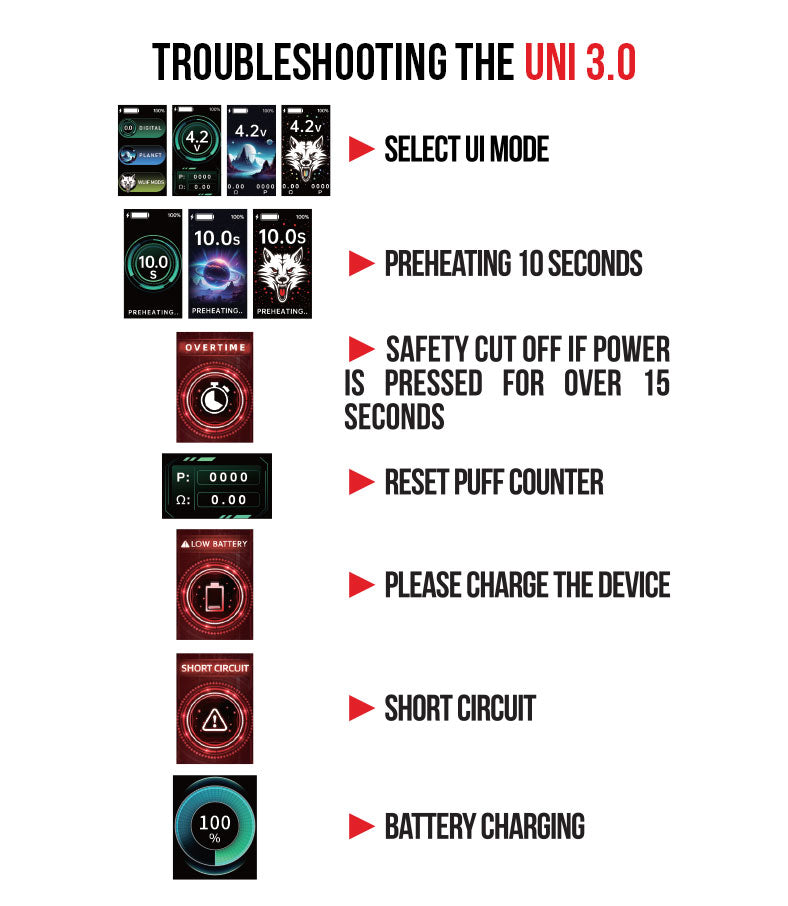
To reset the puff counter on your UNI 3.0, hold down the + and - buttons down at the same time and the counter will revert to zero.
In order to swap between the different UI modes, press the power button 3x in a row to bring up the selection interface. Once up, you can use the + - buttons to scroll through the various options. To confirm your choice, press the power 1x and your UI will switch.
Adjusting The Temperature On Your Wulf Mods UNI 3.0
To change between the different temperatures on your Wulf Mods UNI 3.0, make use of the dedicated + and - buttons. With these you can easily swap through the full range of voltages and find the temperature that fits your cartridge best.
Preheating Your Wulf Mods UNI 3.0
For an extra fiery cloud, press the power button 2x to activate the 10s preheat mode on your Wulf Mods UNI 3.0. When successfully input, you’ll see a 10s countdown on your screen to let you know exactly when your cartridge is ready to hit. Once the 10s is up, you can use your Wulf Mods UNI 3.0 as regular by holding down the power button and drawing from the mouthpiece.
To cancel a preheat mid countdown, just press the power button 2x again and the process will cease.
Charging the Wulf Mods UNI 3.0
Keep your Wulf Mods UNI 3.0 powered using only the included USB-C Charging Cable. While charging, your Wulf Mods UNI 3.0 screen will display the current battery % until it's full, at this point the screen will switch off.
When you first get the Wulf Mods UNI 3.0, plug it in for 1 hour. Never charge the device for longer than 1 hour at a time, as this can lead to issues with safety and battery lifespan.
Troubleshooting Your Wulf Mods UNI 3.0
To make your lives easier, the Wulf Mods UNI 3.0 has a variety of troubleshooting warnings that can appear directly on your screen. Take a look below to learn more.
-
Safety Cutoff: If you hold the power button longer than 15s, the screen will show an “overtime warning”, display a timer icon, and stop heating. To continue your session, release the power button and press it again once more.
-
Low Battery: If your device is in need of a charge, your screen will read “low battery” and display a depleted battery icon. To continue, plug your vaporizer in for an hour for proper charging.
-
Short Circuit: If your screen reads “short circuit” and displays a warning symbol, immediately cease using your device until the message stops displaying.
How to Clean Your Wulf Mods UNI 3.0
Keep your Wulf Mods UNI 3.0 operating at 100% by performing periodic maintenance. To do so always power down your device and then remove the cartridge from its magnetic adapter. From here, take a swap or q-tip damped with isopropyl alcohol and gently scrub away any grime on the magnetic connection and your cartridges threads. Additionally you can wipe down the body of your Wulf Mods UNI 3.0 to make sure no dirt builds up. Always make sure to leave ample time for your device to fully dry before beginning to use it once more.
What’s Included:
- (1) Wulf Mods UNI 3.0 Universal Variable Voltage Battery
- (1) USB-C Charging Cable
- (1) 510 Threaded Magnetic Adapter
- (1) User Manual
Warning: Do not charge with a power bank of 5V or higher. Do not charge in your car. Do not overcharge the battery or use any other charging cable than what comes with your device. Failure to follow these instructions could result in battery damage and frying of the internal system. If the device gets too hot while you are using it, please stop using it for a while. Please avoid using the device while it is charging.





 WARNING: This product can expose you to chemicals including lead, which is known to the State of California to cause cancer and birth defects or other reproductive harm. For more information, go to